整理 build、setuptools、wheel、twine、distutils、distribute 及 hatch 打包相关笔记。
导航
收录来源
raw/langs/pythons/tools/package_deploy.rstraw/langs/pythons/tools/package_deploys/build.rstraw/langs/pythons/tools/package_deploys/practice.rstraw/langs/pythons/tools/package_deploys/setuptools.rstraw/langs/pythons/tools/package_deploys/wheel.rstraw/langs/pythons/tools/package_deploys/distribute.rstraw/langs/pythons/tools/package_deploys/normal.rstraw/langs/pythons/tools/package_deploys/hatch.mdraw/langs/pythons/tools/package_deploys/twine.rstraw/langs/pythons/tools/package_deploys/distutils.rst
条目内容
构建工具 build
- 官网: https://pypi.org/project/build/
- GitHub: https://github.com/pypa/build
- build 是一个用于构建 Python 项目的工具,通常用于生成源码分发包和二进制分发包(如 Wheel)。这些分发包可以用于发布到 Python Package Index (PyPI) 或其他包管理系统,以便他人可以安装和使用你的 Python 项目。
- build 工具旨在提供一种简单而标准的方式来构建 Python 项目。
- 它遵循 PEP 517 和 PEP 518 标准,这些标准定义了 Python 项目的构建过程和构建后端。
- build 工具可以与各种构建后端一起工作,例如 setuptools、flit、poetry 等。是 Setuptools 和其他构建后端的前端工具。
Note
build 管理基于 pyproject.toml 的构建,根据需要调用 build-backend 钩子来构建分发包。它是一个简单的构建工具,不执行任何依赖项管理。所以使用 setup.py 文件的不使用这种方法,而是直接用 python setup.py sdist 构建。
Common arguments
--sdist (-s):
    Produce just an SDist
--wheel (-w):
    Produce just a wheel
-C<option>=<value>:
    A Config-setting, the PEP 517 way of passing options to a backend.
    Can be passed multiple times.
    Matching options will make a list.
    Note that setuptools has very limited support.
--installer:
    Pick an installer for the isolated build (pip or uv).
--no-isolation (-n):
    Disable build isolation.
--skip-dependency-check (-x):
    Disable dependency checking when not isolated;
    this should be done if some requirements or version ranges are not required for non-isolated builds.
--outdir (-o):
    The output directory (defaults to dist`)
Some common combinations of arguments:
--sdist --wheel (-sw):
    Produce an SDist and a wheel, both from the source distribution.
    The default (if no flag is passed) is to build an SDist and then build a wheel from the SDist.
-nx:
    Disable build isolation and dependency checking.
    Identical to pip and uv's --no-build-isolation flag.
基本使用
安装:
pip install --upgrade build
Usage:
python -m build

# 清理
rm -rf build dist *.egg-info
Note
更详细使用参见 pyproject.toml 配置文件。注意 setup.py 配置文件使用命令 python setup.py sdist
完成后应在 dist 目录中生成两个文件:
如果 pyproject.toml 文件内容:
[project]
name = "example_package_YOUR_USERNAME_HERE"
version = "0.0.1"

则生成如下2个文件:
dist/
├── example_package_YOUR_USERNAME_HERE-0.0.1-py3-none-any.whl   # built distribution
└── example_package_YOUR_USERNAME_HERE-0.0.1.tar.gz             # source distribution
常见问题
问题1:
FileNotFoundError: [Errno 2] No such file or directory: '/private/var/.../tx_agent-0.1.0/requirements.txt'
ERROR Backend subprocess exited when trying to invoke get_requires_for_build_wheel
问题定位:
可能是因为项目中的依赖文件(如 requirements.txt)没有包含在打包过程中,或者你的 setup.py 中的依赖指定不正确
根因:
    方法一:
        pip -m build
    方法二:
        pip -m build --sdist
        pip -m build --wheel
    上面的命令与下面2个命令的不同点在于
        pip -m build --wheel 是基于当前源码包打的wheel
        而上面的命令是基于前面打的 sdist 包打的wheel
        而 dsist 包中没有 requirements.txt 文件(可能通过解压 dist/name.xxx.tar 文件查看)
解决方法:
往 MANIFEST.in 文件写入如下配置:
include requirements.txt
问题2:
python -m build 执行成功,但生成包解压后发现内容不对
问题定位:
可能是有缓存
解决方法:
rm -rf build dist *.egg-info
实战
打包工具setuptools
- 官网: https://setuptools.pypa.io/en/latest/index.html
- GitHub: https://github.com/pypa/setuptools
- Pypi: https://pypi.org/project/setuptools/
Note
Setuptools 是用于构建和分发 Python 项目的主要工具之一。配置文件是 pyproject.toml ,但也可使用 setup.py 做为配置文件以实现兼容性。
安装:
pip install --upgrade setuptools
注意:
    一般不需要专门下载,推荐使用 build 命令配置好 pyproject.toml 文件
    使用时自动下载 setuptools
- Setuptools 是 Python 的一个强大且广泛使用的打包工具,旨在简化 Python 项目的打包、分发和安装过程。
- 它扩展了 Python 的标准 distutils,提供了更多的功能和灵活性,使开发者能够更高效地管理项目的依赖关系和发布流程。
wheel
安装:
pip install wheel
生成whl文件
Converting Eggs to Wheels:
# It works on both .egg files and .egg directories,
# and you can convert multiple eggs with a single command:
$ wheel convert blah-1.2.3-py2.7.egg foo-2.0b1-py3.5.egg
使用whl文件安装应用
Usage:
$ pip install someproject-1.5.0-py2-py3-none.whl
常用命令
wheel convert
-
Convert one or more eggs (.egg; made with bdist_egg) or Windows installers (.exe; made with bdist_wininst) into wheels.
-
Egg names must match the standard format:
<project>-<version>-pyX.Y for pure Python wheels
<project>-<version>-pyX.Y-<arch> for binary wheels
$ wheel convert foobar-1.2.3-py2.7.egg
$ ls *.whl
foobar-1.2.3-py27-none.whl
wheel unpack
- Unpack the given wheel file.
- This is the equivalent of unzip <wheel_file>, except that it also checks that the hashes and file sizes match with those in RECORD and exits with an error if it encounters a mismatch.
$ wheel unpack someproject-1.5.0-py2-py3-none.whl
Unpacking to: ./someproject-1.5.0
wheel pack
- Repack a previously unpacked wheel file.
- This command can be used to repack a wheel file after its contents have been modified. This is the equivalent of zip -r <wheel_file> <wheel_directory> except that it regenerates the RECORD file which contains hashes of all included files.
$ wheel unpack someproject-1.5.0-py2-py3-none.whl
Unpacking to: ./someproject-1.5.0
$ touch someproject-1.5.0/somepackage/module.py
$ wheel pack --build-number 2 someproject-1.5.0
Repacking wheel as ./someproject-1.5.0-2-py2-py3-none.whl...OK
wheel tags
- Make a new wheel with given tags from and existing wheel.
- Any tags left unspecified will remain the same. Multiple tags are separated by a “.” Starting with a “+” will append to the existing tags. Starting with a “-” will remove a tag. Be sure to use the equals syntax on the shell so that it does not get parsed as an extra option, such as —python-tag=-py2. The original file will remain unless —remove is given. The output filename(s) will be displayed on stdout for further processing.
$ wheel tags --python-tag=py2.py3 --abi-tag=none cmake-3.20.2-cp39-cp39-win_amd64.whl
cmake-3.20.2-py2.py3-none-win_amd64.whl
distribute的使用
Warning
Distribute 不再作为独立项目存在,请使用 setuptools
- Distribute是对标准库disutils模块的增强,我们知道disutils主要是用来更加容易的打包和分发包,特别是对其他的包有依赖的包
- Distribute 是 Setuptools 的一个分支,创建的初衷是为了改进 Setuptools 的缺点,并提供更稳定和现代化的功能。在 Setuptools 的发展过程中,曾经出现过一段时间的停滞,导致一些问题得不到及时修复。Distribute 应运而生,旨在解决这些问题,并提供额外的功能。
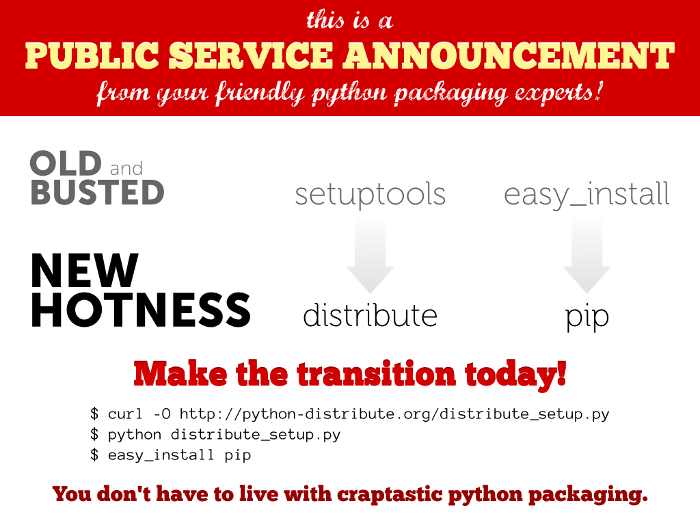
安装Distribute:
通过easy_install, pip来安装
通过源文件来安装
不过使用distribute_setup.py来安装是最简单和受欢迎的方式:

  $ curl -0 http://python-distribute.org/distribute_setup.py
  $ sudo python distribute_setup.py
通用
- Overview of Python Packaging: https://packaging.python.org/en/latest/overview/
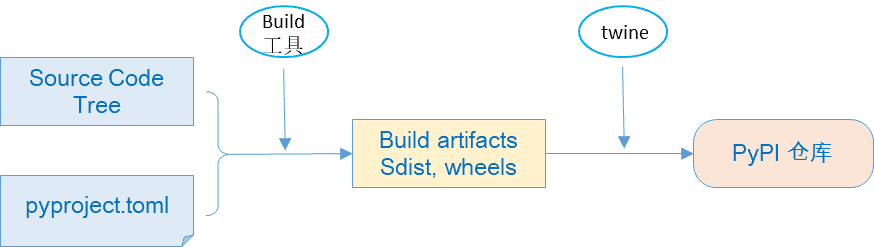
打包与部署流程:
创建与配置项目
打包项目
上传项目至PyPi 或 私有化仓库
下载与安装项目
打包后,会生成两种主要的发布组件(artifect):
1. 源文件包
    即python源文件,简写为 sdist ,包含.py, 资源文件,数据文件等
2. 二进制包
    编译后的二进制格式,通常为wheel 格式, 也可以将非python第3方库合并打包。其安装器是pip.
打包工具:
1. distutils: 最老的python打包工具, 使用 ``setup.py`` 做为配置文件
2. setuptools: 取代distutils,配置文件为 ``pyproject.toml``, 但同时也可使用setup.py做为配置文件
3. 其它的打包工具有:Poetry 工具。Pipenv, PDM
Packaging Python libraries and tools
Note
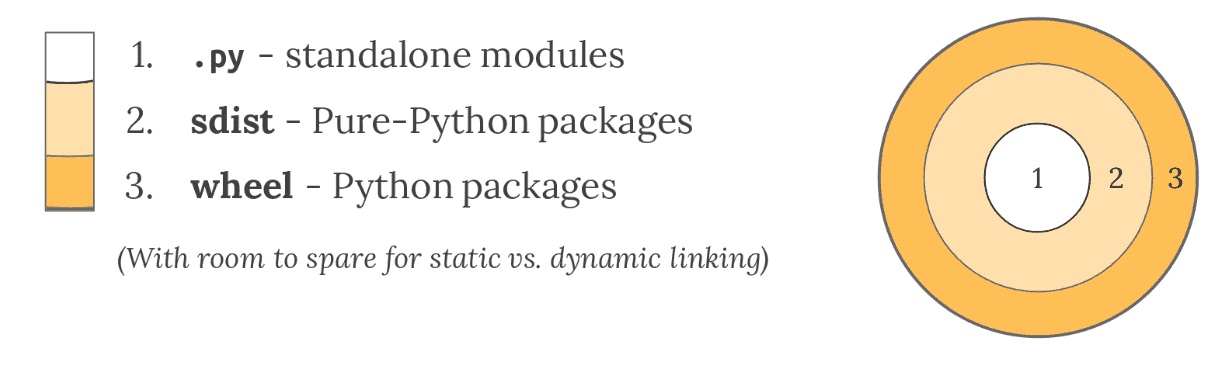
适用于开发环境。Python 的原生打包主要用于在开发人员之间分发可重用的代码(称为库)。
Python modules
- 适用于一个Python 文件,且仅依赖于标准库
Python source distributions
- 适用于多个 Python 文件组成
- 通常将其组织到一个目录结构中。任何包含 Python 文件的目录都可以组成 Import Package。
Note
只要您的代码只包含纯 Python 代码,并且您知道您的部署环境支持您的 Python 版本,那么您就可以使用 Python 的本机打包工具创建源分发包,简称 sdist
- Python 的 sdist 是包含一个或多个包或模块的压缩档案(.tar.gz文件)。
Python binary distributions
- Python 的大部分实用功能来自于它与软件生态系统集成的能力,特别是用 C、C++、Fortran、Rust 和其他语言编写的库。
- 并非所有开发人员都拥有合适的工具或经验来构建这些以这些编译语言编写的组件,因此 Python 创建了 Wheel,这是一种包格式,旨在提供带有已编译工件的库。
Packaging Python applications
Note
适用于生产环境。应用程序打包(application packaging)对目标环境的依赖关系来组织这些应用程序打包
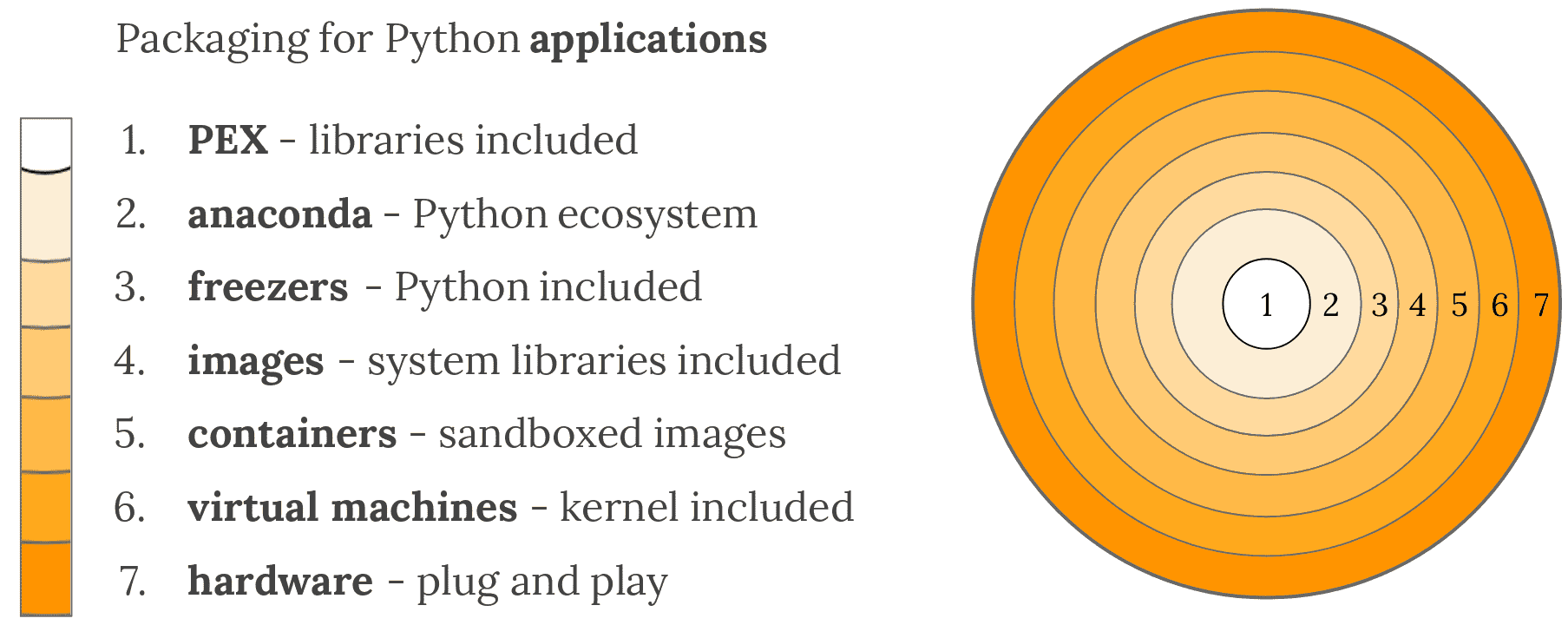
1. Depending on a pre-installed Python
- PEX (Python EXecutable)
- zipapp (does not help manage dependencies, requires Python 3.5+)
- shiv (requires Python 3)
2. Depending on a separate software distribution ecosystem
-
Anaconda ecosystem
-
others:
- ActiveState ActivePython
- WinPython
3. Bringing your own Python executable
- pyInstaller - Cross-platform
- cx_Freeze - Cross-platform
- constructor - For command-line installers
- py2exe - Windows only
- py2app - Mac only
- osnap - Windows and Mac
- pynsist - Windows only
5. Bringing your own userspace
- AppImage
- Docker
- Flatpak
- Snapcraft
6. Bringing your own kernel
- Vagrant
- VHD, AMI, and other formats
- OpenStack - A cloud management system in Python, with extensive VM support
7. Bringing your own hardware
- Adafruit
- MicroPython
The Packaging Flow
Publishing a package 需要从作者的源代码到包分发服务的流程。实现此目的的步骤是:
1. 具有包含包的源代码
2. 准备一个配置文件,描述软件包元数据(名称、版本等)以及如何创建构建构件
    对于大多数包,这将是一个 pyproject.toml 文件,在源代码中手动维护。
3. 创建要发送到包分发服务(通常是 PyPI)的构建构件
    这些通常是一个 source distribution (“sdist”) 和一个或多个 built distributions (“wheels”)
4. 将生成构件上传到包分发服务。
use the package:
1. 从包分发服务下载包的 build artifacts
2. 将其安装在他们的 Python 环境中,通常在其 site-packages 目录中
    此步骤可能涉及构建/编译步骤,如果需要,必须由包元数据描述
The configuration file
- 配置文件取决于用于创建构建构件的工具。标准做法是使用 TOML 格式的 pyproject.toml 文件。
- pyproject.toml 文件至少需要一个 [build-system] 表来指定您的构建工具。有许多可用的构建工具,包括但不限于
flit、hatch、pdm、poetry、Setuptools、trampolium和whey
例如,下面是一个使用 hatch 的表:
[build-system]
requires = ["hatchling"]
build-backend = "hatchling.build"
- 在
pyproject.toml文件中有这样的表,像build这样的“前端”工具可以运行你选择的构建工具的“后端”来创建构建工件。 - 像 pip 这样的安装工具也充当前端
Note
请参阅 pyproject.toml
Build artifacts
The source distribution (sdist)
The build package knows how to invoke your build tool to create one of these:
python3 -m build --sdist source-tree-directory
The built distributions (wheels)
The build package knows how to invoke your build tool to create one of these:
python3 -m build --wheel source-tree-directory
Upload to the package distribution service
The twine tool can upload build artifacts to PyPI for distribution, using a command like:
twine upload dist/package-name-version.tar.gz dist/package-name-version-py3-none-any.whl
Download and install
python3 -m pip install package-name
Glossary
- Binary Distribution: 一种特定类型的
Built Distribution,其中包含已编译的扩展 - Build Backend: 一个采用源代码树并从中构建源代码分发或构建分发的库。构建由前端委托给后端。所有后端都提供标准化接口。构建后端的示例包括: flit’s flit-core, hatch’s hatchling, Maturin, meson-python, scikit-build-core, and Setuptools.
- Build Frontend:
- Built Distribution: 一种分发格式,包含文件和元数据,只需将其移动到目标系统上的正确位置即可进行安装。Wheel 是这样的格式,而 Source Distribution 不是,因为它需要一个构建步骤才能安装。
hatch
简介
- Hatch是Python生态系统中的一个现代化的项目、包和虚拟环境管理工具,旨在简化Python项目的创建、打包和发布流程。
- 通过在pyproject.toml中定义Hatch的相关配置,开发者可以指定如何构建他们的项目以及设置其他相关选项。
安装
brew install hatch

pipx install hatch
conda install -c conda-forge hatch
示例
[build-system]
requires = ["hatchling"]
build-backend = "hatchling.build"

[tool.hatch.version]
path = "my_package/__init__.py"

[tool.hatch.envs.default]
dependencies = [
  "pytest",
  "coverage[toml]",
]requires:构建项目所需的依赖列表,这里声明了hatchling,它会在打包时被安装进隔离环境build-backend:指定构建后端,hatchling.build是 hatchling 提供的标准后端接口
twine
- twine 是一个用于上传 Python 分发包(通常是源代码包 .tar.gz 或二进制包 .whl)到 Python Package Index (PyPI) 或其他 Python 软件包存储库的工具。
- 它通常用于发布 Python 包,并确保发布过程的安全性和可靠性,比传统的 python setup.py upload(Setuptools 内置的上传功能)更安全,因为它可以避免一些与上传直接关联的安全风险,并支持更加可靠的认证和上传机制。
安装:
pip install --upgrade twine
使用:
# 指定 ~/.pypirc 文件中指定的repo
twine upload --repository testpypi dist/*

# 指定repo url
twine upload --repository-url https://test.pypi.org/ dist/*
示例
修改 ~/.pypirc 配置 testpypi :
[distutils]
index-servers =
    nexus
    pypitest

[default]
repository: nexus

[nexus]
repository=http://10.140.13.16:9081/repository/pypi/
username=admin
password=admin123
指定 testpypi 上传:
$ twine upload --repository testpypi dist/*
Uploading distributions to https://test.pypi.org/legacy/
Enter your username: peter
Enter your password:
Uploading face_push-0.0.1-py3-none-any.whl
100% ---------------------------------------- 18.6/18.6 kB • 00:00 • ?
Uploading face_push-0.0.1.tar.gz
100% ---------------------------------------- 17.5/17.5 kB • 00:00 • ?

参见:
https://test.pypi.org/project/face-push/0.0.1/
安装&使用:
pip install --index-url https://test.pypi.org/simple/ --no-deps example-package
常见问题
问题1:
ERROR    HTTPError: 400 Bad Request from http://10.140.13.16:9081/repository/pypi/
    pypi/packages/tx-agent/0.1.0/tx_agent-0.1.0-py3-none-any.whl cannot be updated
原因定位:
1. 可能是版本冲突,也就是说现在仓库中已经有指定的版本了
distutils
Warning
最老的python打包工具是 distutils , 使用 setup.py 做为配置文件。 后被 setuptools 工具取代,已从 Python 3.12 的标准库中删除