通用
- Overview of Python Packaging: https://packaging.python.org/en/latest/overview/
打包与部署流程:
创建与配置项目
打包项目
上传项目至PyPi 或 私有化仓库
下载与安装项目
打包后,会生成两种主要的发布组件(artifect):
1. 源文件包
    即python源文件,简写为 sdist ,包含.py, 资源文件,数据文件等
2. 二进制包
    编译后的二进制格式,通常为wheel 格式, 也可以将非python第3方库合并打包。其安装器是pip.
打包工具:
1. distutils: 最老的python打包工具, 使用 setup.py 做为配置文件
2. setuptools: 取代distutils,配置文件为 pyproject.toml, 但同时也可使用setup.py做为配置文件
3. 其它的打包工具有:Poetry 工具。Pipenv, PDM
相关: distutils、setuptools、wheel
Packaging Python libraries and tools
Note: 适用于开发环境。Python 的原生打包主要用于在开发人员之间分发可重用的代码(称为库)。
Python modules
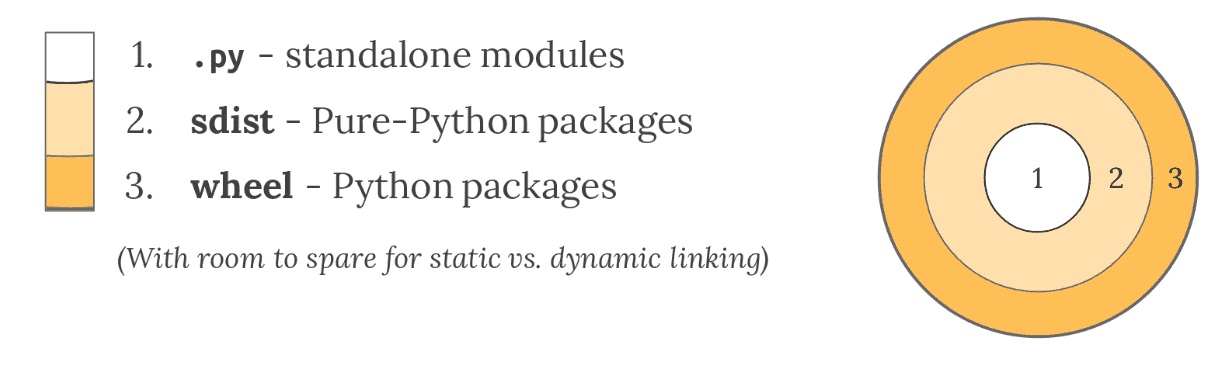
- 适用于一个Python 文件,且仅依赖于标准库
Python source distributions
- 适用于多个 Python 文件组成
- 通常将其组织到一个目录结构中。任何包含 Python 文件的目录都可以组成 Import Package。
Note: 只要您的代码只包含纯 Python 代码,并且您知道您的部署环境支持您的 Python 版本,那么您就可以使用 Python 的本机打包工具创建源分发包,简称
sdist
- Python 的 sdist 是包含一个或多个包或模块的压缩档案(.tar.gz文件)。
Python binary distributions
- Python 的大部分实用功能来自于它与软件生态系统集成的能力,特别是用 C、C++、Fortran、Rust 和其他语言编写的库。
- 并非所有开发人员都拥有合适的工具或经验来构建这些以这些编译语言编写的组件,因此 Python 创建了 wheel,这是一种包格式,旨在提供带有已编译工件的库。
Packaging Python applications
Note: 适用于生产环境。应用程序打包(application packaging)对目标环境的依赖关系来组织这些应用程序打包
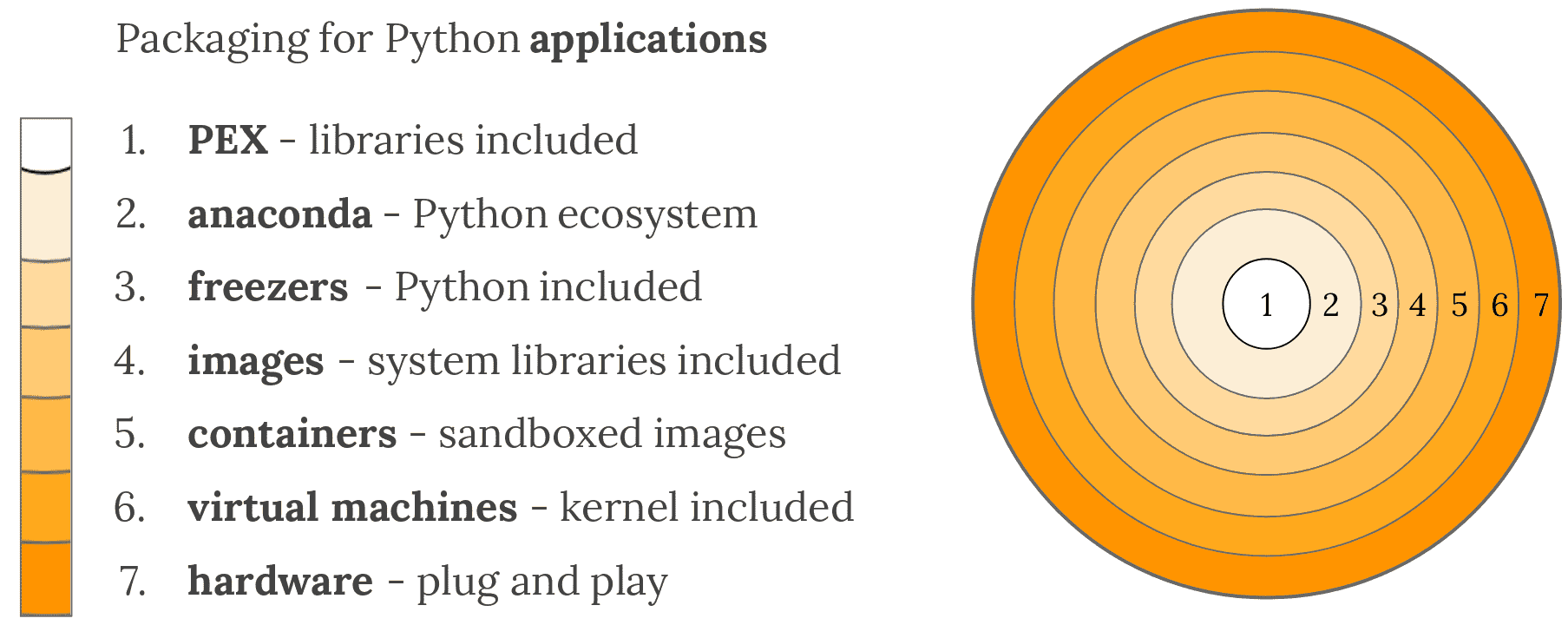
1. Depending on a pre-installed Python
- PEX (Python EXecutable)
- zipapp (does not help manage dependencies, requires Python 3.5+)
- shiv (requires Python 3)
2. Depending on a separate software distribution ecosystem
- Anaconda ecosystem
- others:
- ActiveState ActivePython
- WinPython
3. Bringing your own Python executable
- pyInstaller - Cross-platform
- cx_Freeze - Cross-platform
- constructor - For command-line installers
- py2exe - Windows only
- py2app - Mac only
- osnap - Windows and Mac
- pynsist - Windows only
5. Bringing your own userspace
- AppImage
- Docker
- Flatpak
- Snapcraft
6. Bringing your own kernel
- Vagrant
- VHD, AMI, and other formats
- OpenStack - A cloud management system in Python, with extensive VM support
7. Bringing your own hardware
- Adafruit
- MicroPython
The Packaging Flow
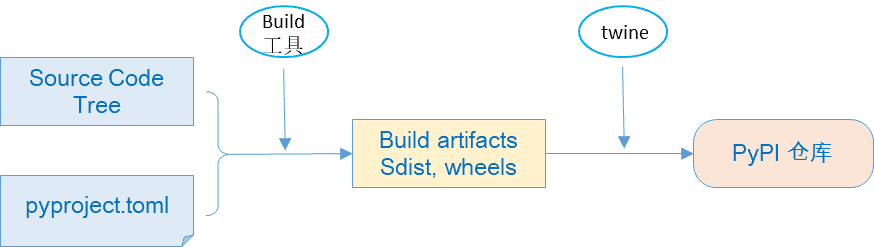
Publishing a package 需要从作者的源代码到包分发服务的流程。实现此目的的步骤是:
1. 具有包含包的源代码
2. 准备一个配置文件,描述软件包元数据(名称、版本等)以及如何创建构建构件
    对于大多数包,这将是一个 pyproject.toml 文件,在源代码中手动维护。
3. 创建要发送到包分发服务(通常是 PyPI)的构建构件
    这些通常是一个 source distribution ("sdist") 和一个或多个 built distributions ("wheels")
4. 将生成构件上传到包分发服务。
use the package:
1. 从包分发服务下载包的 build artifacts
2. 将其安装在他们的 Python 环境中,通常在其 site-packages 目录中
    此步骤可能涉及构建/编译步骤,如果需要,必须由包元数据描述
The configuration file
- 配置文件取决于用于创建构建构件的工具。标准做法是使用 TOML 格式的 pyproject.toml 文件。
- pyproject.toml 文件至少需要一个 [build-system] 表来指定您的构建工具。有许多可用的构建工具,包括但不限于
flit、hatch、pdm、poetry、Setuptools、trampolium和whey
例如,下面是一个使用 hatch 的表:
[build-system]
requires = ["hatchling"]
build-backend = "hatchling.build"- 在
pyproject.toml文件中有这样的表,像 build 这样的”前端”工具可以运行你选择的构建工具的”后端”来创建构建工件。 - 像 pip 这样的安装工具也充当前端
Note: 请参阅 pyproject.toml
Build artifacts
The source distribution (sdist)
The build package knows how to invoke your build tool to create one of these:
python3 -m build --sdist source-tree-directoryThe built distributions (wheels)
The build package knows how to invoke your build tool to create one of these:
python3 -m build --wheel source-tree-directoryUpload to the package distribution service
The twine tool can upload build artifacts to PyPI for distribution, using a command like:
twine upload dist/package-name-version.tar.gz dist/package-name-version-py3-none-any.whlDownload and install
python3 -m pip install package-nameGlossary
- Binary Distribution: 一种特定类型的
Built Distribution,其中包含已编译的扩展 - Build Backend: 一个采用源代码树并从中构建源代码分发或构建分发的库。构建由前端委托给后端。所有后端都提供标准化接口。构建后端的示例包括: flit’s flit-core, hatch’s hatchling, Maturin, meson-python, scikit-build-core, and Setuptools.
- Build Frontend:
- Built Distribution: 一种分发格式,包含文件和元数据,只需将其移动到目标系统上的正确位置即可进行安装。Wheel 是这样的格式,而 Source Distribution 不是,因为它需要一个构建步骤才能安装。